Optimizing Skills for Alexa Commands: A Comprehensive Guide
Introduction
Amazon Echo has revolutionized the way we interact with technology, and at the heart of this revolution is Alexa, Amazon's voice-controlled assistant. With the ability to perform thousands of tasks, Alexa has become an indispensable part of our daily lives. However, to unlock the full potential of Alexa, you need to know how to optimize skills for Alexa commands.
What are Alexa Skills?
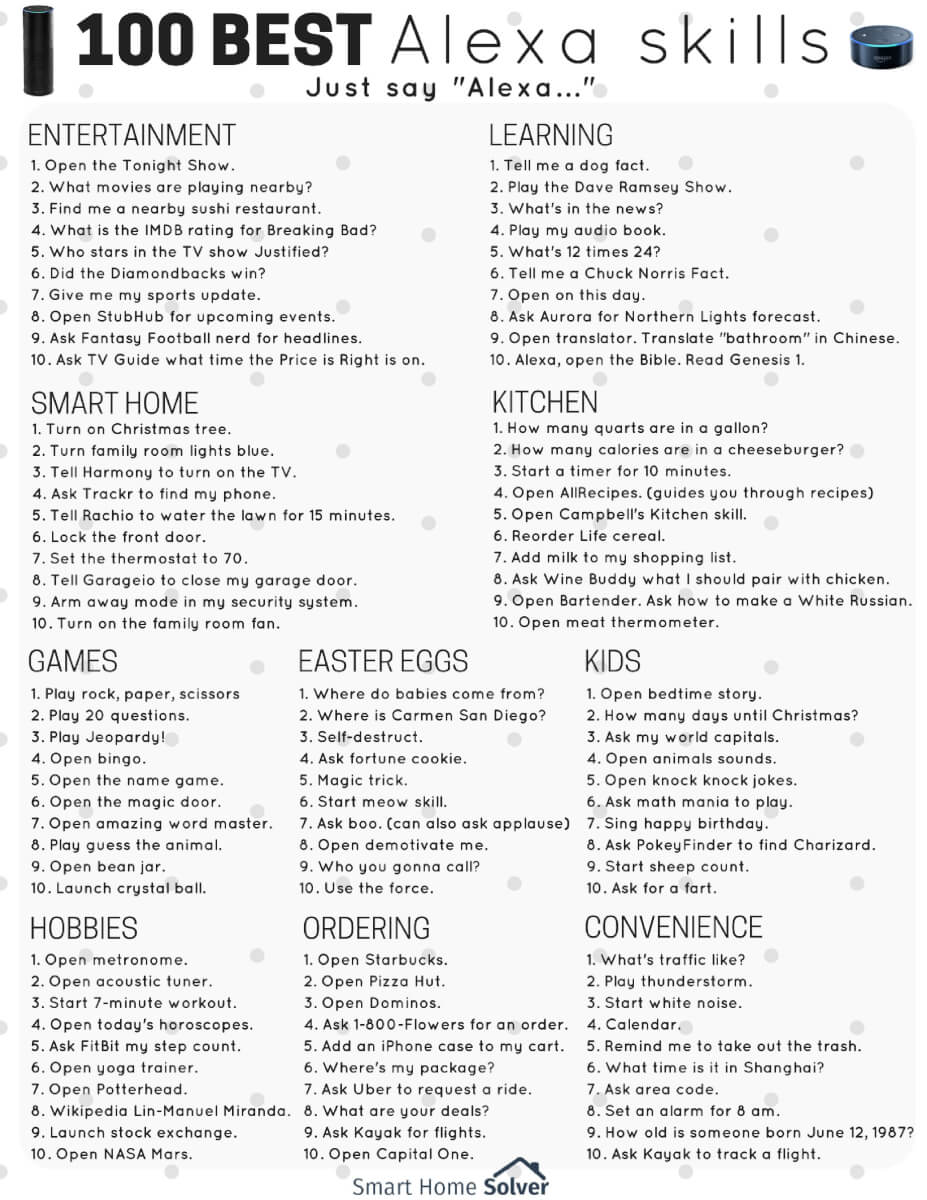
Alexa skills are essentially apps running on Alexa's software, and they enable users to access various services, control smart devices, and more. With over 100,000 skills available, users can customize their Alexa experience to suit their needs. Think of skills as voice-controllable smartphone apps, and you'll understand why they're so powerful.
The Importance of Optimizing Skills for Alexa Commands
When customers interact with Alexa, they expect a seamless and efficient experience. For your Alexa skill, high performance is crucial for engaging users and retaining their interest. Optimizing skills for Alexa commands requires strategic planning, expertise, and the right tools. In this guide, we'll walk you through the process of optimizing skills for Alexa commands and provide actionable tips to help you get the most out of your Alexa experience.
Optimization Strategies for Alexa Skills
To optimize your Alexa skills, you need to consider the following strategies:
- Speed Up or Slow Down Alexa's Responses: Adjust the speed of Alexa's responses to suit your needs. You can speed up or slow down the responses to make the experience more comfortable.
- Use Custom Alexa Routines: Create custom Alexa routines that respond uniquely to commands or phrases you frequently use. This will make interactions more tailored to your preferences.
- Optimize Memory Allocation: Allocate the right amount of memory to your skill Lambda function to ensure smooth performance.
- Use IFTTT to Teach Alexa New Commands: Set up IFTTT (If This Then That) to teach Alexa new commands and expand its capabilities.
Best Practices for Creating High-Performance Alexa Skills
To create high-performance Alexa skills, follow these best practices:
- Analyze Memory Usage: Analyze the max memory used by your skill to optimize memory allocation.
- Use AWS Lambda and Amazon DynamoDB Resources: Leverage AWS Lambda and Amazon DynamoDB resources to create high-performance skills.
- Test and Refine Your Skill: Test and refine your skill regularly to ensure smooth performance and user engagement.
Conclusion
Optimizing skills for Alexa commands is crucial for ensuring a seamless and efficient user experience. By following the strategies and best practices outlined in this guide, you can unlock the full potential of Alexa and create high-performance skills that engage users and retain their interest. Remember, with over 100,000 skills available, the possibilities are endless, and with the right optimization strategies, you can make Alexa shine.