Protecting Your Wi-Fi Network from Hackers: A Comprehensive Guide
In today's digital age, a secure Wi-Fi network is no longer a luxury, but a necessity. With the increasing number of devices connected to the internet, the risk of hackers infiltrating your network is higher than ever. In this article, we'll explore the basics of protecting your Wi-Fi network from hackers and provide you with practical tips and strategies to keep your network safe.
Understanding the Risks
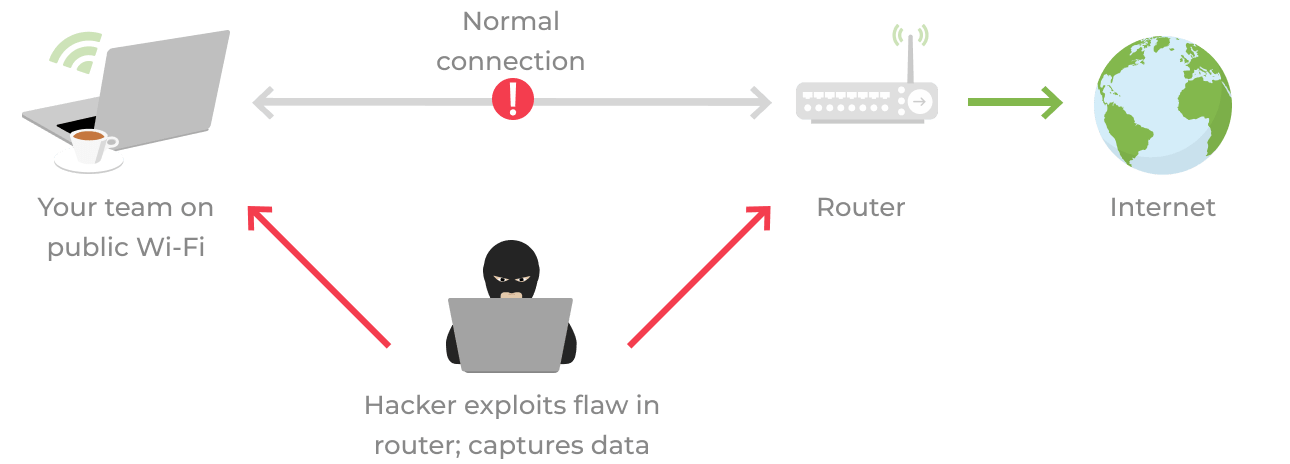
Hackers can exploit vulnerabilities in your Wi-Fi network to gain unauthorized access to your devices, steal sensitive information, and disrupt your online activities. To protect your network, it's essential to understand the risks and take proactive measures to prevent them. Here are some of the common risks associated with unprotected Wi-Fi networks:
- Unencrypted data transmission
- Password cracking
- Malware and ransomware attacks
- Data theft and identity theft
- Unwanted bandwidth usage and slow internet speeds
Positioning Your Router for Optimal Security
The first step in protecting your Wi-Fi network is to position your router in a central location. This will help ensure that your network signal is strong and evenly distributed throughout your home or office. Here are some additional tips to optimize your router's security:
- Change the default admin password and ensure it's strong and unique
- Update your router's firmware regularly
- Disable WPS (Wi-Fi Protected Setup) and WPS2
- Enable MAC address filtering
- Set up a guest network for visitors
Choosing the Right Wi-Fi Network Name and Password
Your Wi-Fi network name (SSID) and password are the first line of defense against hackers. Here are some tips to choose the right network name and password:

- Choose a unique and complex password that includes numbers, letters, and special characters
- Change your password regularly (every 60-90 days)
- Avoid using easily guessable information such as your name, address, or birthdate
- Use a strong and unique network name that's not easily identifiable
Using a VPN and Encryption
A Virtual Private Network (VPN) and encryption are essential tools for protecting your Wi-Fi network. A VPN encrypts your internet traffic, making it unreadable to hackers, while encryption ensures that your data is secure and protected. Here are some tips to use a VPN and encryption:
- Use a reputable VPN service that offers robust encryption and security features
- Enable encryption on your devices and network
- Use a VPN when connecting to public Wi-Fi networks
Monitoring and Maintaining Your Network
Monitoring and maintaining your network is essential to prevent hacking and data breaches. Here are some tips to monitor and maintain your network:
- Regularly check for firmware updates and install them
- Monitor your network activity and look for suspicious behavior
- Use network scanning tools to detect vulnerabilities and fix them
- Keep your devices and software up-to-date with the latest security patches
Conclusion
Protecting your Wi-Fi network from hackers requires a combination of technical knowledge and practical steps. By understanding the risks, positioning your router for optimal security, choosing the right Wi-Fi network name and password, using a VPN and encryption, and monitoring and maintaining your network, you can keep your network safe and secure. Remember, a secure Wi-Fi network is not a one-time task, but an ongoing process that requires regular maintenance and attention.