Best Blue Light Blocking Software: A Comprehensive Guide
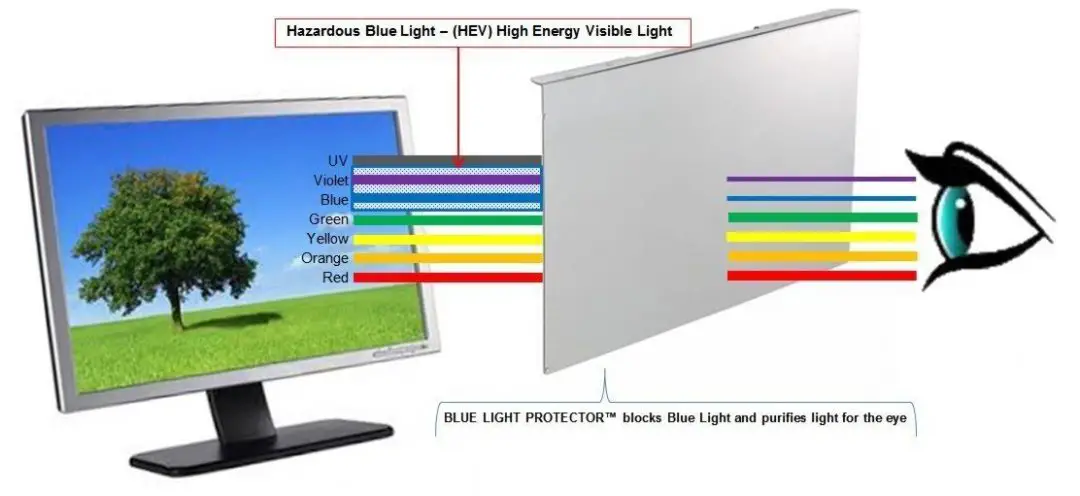
Are you tired of feeling tired and groggy after a long day of staring at your computer screen? Do you experience eye strain and headaches due to prolonged exposure to blue light? If so, you're not alone. Blue light, a type of high-energy visible (HEV) light emitted by digital devices, can disrupt our natural sleep-wake cycle, cause eye fatigue, and even lead to long-term health problems.
What is Blue Light and How Does it Affect Our Health?
Blue light is a portion of the visible light spectrum that is on the higher end of the frequency range, with a wavelength of around 400-450 nanometers. It is emitted by digital devices such as smartphones, tablets, computers, and televisions, as well as LED light bulbs and fluorescent lighting. Prolonged exposure to blue light can suppress the production of melatonin, the hormone that regulates our sleep-wake cycle, leading to a range of negative health effects, including:
- Eye strain and fatigue
- Headaches and migraines
- Insomnia and disrupted sleep patterns
- Long-term risks of macular degeneration and cataracts
Best Blue Light Blocking Software for Windows, Mac, and Linux
Fortunately, there are several blue light blocking software options available for Windows, Mac, and Linux that can help reduce eye strain and improve sleep quality. Here are some of the best blue light blocking software options for each platform:
Windows
- Iris: A popular blue light blocking software for Windows that reduces eye strain and improves sleep quality.
- Flux: A free blue light filtering software that automatically adjusts the color temperature of your screen based on the time of day.
- Redshift: A free and open-source blue light filtering software that adjusts the color temperature of your screen based on the time of day.
- CareUEyes: A free blue light filtering software that reduces eye strain and improves sleep quality, with smooth and automatic color temperature transitions.
Mac
- Flux: A free blue light filtering software that automatically adjusts the color temperature of your screen based on the time of day.
- Redshift: A free and open-source blue light filtering software that adjusts the color temperature of your screen based on the time of day.
- Iris: A popular blue light blocking software for Mac that reduces eye strain and improves sleep quality.
Linux
- Redshift: A free and open-source blue light filtering software that adjusts the color temperature of your screen based on the time of day.
- Irssi: A free and open-source blue light filtering software that reduces eye strain and improves sleep quality.
How to Choose the Best Blue Light Blocking Software
When choosing the best blue light blocking software for your needs, consider the following factors:
- Effectiveness: Look for software that can effectively reduce eye strain and improve sleep quality.
- Ease of use: Choose software that is easy to install and use, with clear instructions and settings.
- Customization: Opt for software that allows you to customize the color temperature and brightness of your screen to suit your needs.
- Platform compatibility: Make sure the software is compatible with your operating system (Windows, Mac, or Linux).
- Reviews and ratings: Check online reviews and ratings to ensure the software is reliable and effective.
Conclusion
Blue light blocking software can be a valuable tool in reducing eye strain and improving sleep quality. By choosing the best software for your needs and following the tips outlined in this article, you can take the first step towards protecting your eyes and promoting overall health and well-being. Remember, a healthy body and mind start with a healthy sleep-wake cycle, and blue light blocking software can help you achieve just that.