How to Set Up a Gateway Skill for Alexa: A Step-by-Step Guide
Amazon's Alexa is a popular virtual assistant that allows users to control various smart devices, access information, and more using voice commands. One of the most powerful features of Alexa is its ability to interact with external devices and services through Skills. In this article, we'll guide you through the process of setting up a Gateway Skill for Alexa, which enables your device or service to communicate with the Alexa ecosystem.
What is a Gateway Skill?
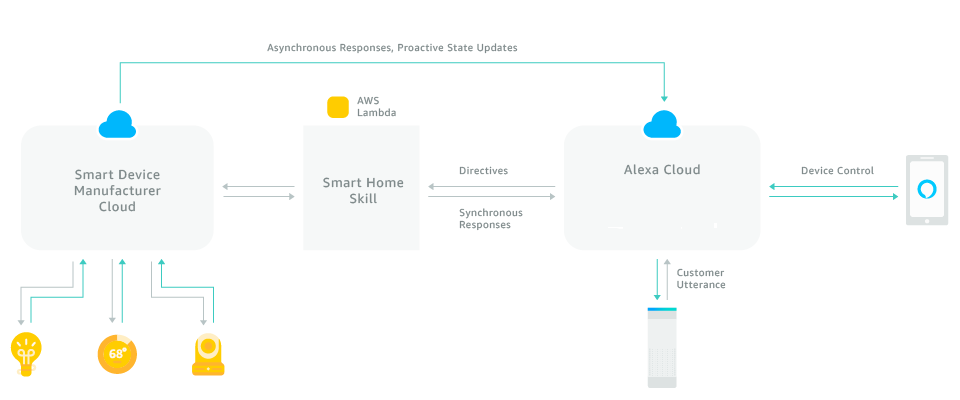
A Gateway Skill is a type of Skill that allows your device or service to act as a bridge between your system and the Alexa platform. It enables you to send proactive events to Alexa, receive asynchronous responses, and control your devices or service using voice commands. With a Gateway Skill, you can create a seamless experience for your users, making it easy for them to interact with your device or service using voice commands.
Prerequisites for Setting Up a Gateway Skill
Before you start setting up a Gateway Skill, you need to make sure that you have the following:
- An Alexa account and a device or service that you want to integrate with Alexa
- A deep understanding of your device or service's API and how it interacts with other systems
- A valid OAuth 2.0 or other authentication mechanism for your API endpoints
Step 1: Create an Amazon Developer Account and Set Up a Skill
To create a Gateway Skill, you need to have an Amazon Developer account and create a new Skill in the Amazon Developer Console. Follow these steps:
- Go to the Amazon Developer Console and sign in with your Amazon account
- Click on "Create a New Skill" and choose the type of Skill you want to create (Gateway Skill)
- Fill in the required information, such as the Skill name, description, and keywords
- Click on "Create Skill" to create the new Skill
Step 2: Set Up the API Gateway
The next step is to set up the API Gateway, which is the entry point for your device or service's API. You'll need to configure the API Gateway to accept requests from Alexa and send responses back to Alexa. Follow these steps:
- Go to the AWS Management Console and navigate to the API Gateway dashboard
- Create a new API and add a method (e.g., POST) to handle requests from Alexa
- Configure the request mapping to handle incoming requests from Alexa
- Set up the response mapping to handle outgoing responses to Alexa
Step 3: Implement the Skill's Business Logic
Now it's time to implement the business logic of your Skill, which includes handling requests from Alexa, processing the data, and sending responses back to Alexa. You'll need to write code to handle the following:
- Validation of incoming requests from Alexa
- Processing and manipulating the request data
- Calling your device or service's API to execute the request
- Constructing the response to send back to Alexa
Step 4: Test and Publish the Skill
Finally, it's time to test and publish your Skill. Make sure to test your Skill thoroughly to ensure that it works as expected. Once you're satisfied, publish your Skill for users to discover and enable in the Alexa app.
Conclusion
Setting up a Gateway Skill for Alexa requires a deep understanding of your device or service's API and how it interacts with other systems. By following the steps outlined in this guide, you can create a seamless experience for your users, enabling them to interact with your device or service using voice commands. Remember to test and publish your Skill carefully to ensure a smooth user experience.
Further Reading
For more information on developing Skills for Alexa, check out the official Alexa Skills Kit documentation and the Alexa Developer Blog. Additionally, you can explore the various resources available on the Amazon Developer Console, including tutorials, guides, and SDKs.