Setting Up a Secure WiFi Network for Small Business: A Comprehensive Guide
As a small business owner, having a reliable and secure WiFi network is essential for productivity, customer satisfaction, and competitiveness in today's digital age. In this article, we will walk you through the process of setting up a secure WiFi network for your small business, from choosing the right equipment to securing your network.Why a Secure WiFi Network is Crucial for Small Businesses
A secure WiFi network is not just a nicety; it's a necessity for small businesses. A reliable network ensures that your employees can work efficiently, and your customers can access your services without interruptions. Moreover, a secure network protects your business from cyber threats, which can be devastating for small businesses with limited resources.Choosing the Right Equipment
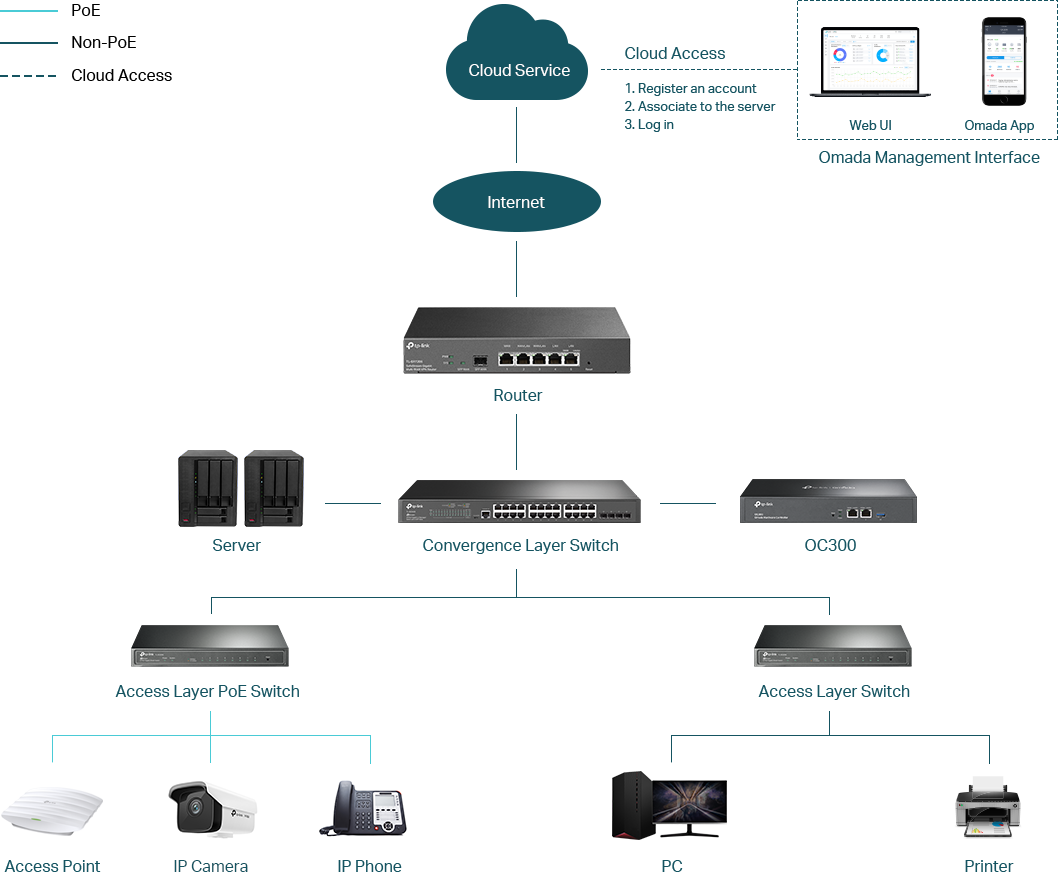
Before you start setting up your WiFi network, you need to choose the right equipment. This includes:- Modem/Router: This is the heart of your WiFi network. Look for a modem/router combo that supports the latest WiFi standards (e.g., Wi-Fi 6) and has a high speed to accommodate your business needs.
- Access Points: These are devices that extend your WiFi network to different areas of your business, ensuring a strong and reliable signal.
- Switches: These devices manage data traffic within your network, ensuring that your business applications and services operate smoothly.
Securing Your Network
Securing your network is a crucial step in setting up your WiFi network. Here are some best practices to follow:- SSID and Password: Create a strong and unique SSID (network name) and password to prevent unauthorized access.
- Firewall Configuration: Configure your firewall to block unauthorized incoming traffic and only allow incoming traffic from trusted sources.
- Encryption: Use WPA3 encryption (or later) to prevent eavesdropping and ensure data confidentiality.
- Guest Network: Create a separate guest network for visitors and customers to prevent them from accessing your main network.
Setting Up Your WiFi Network
Now that you have chosen the right equipment and secured your network, it's time to set it up. Here's a step-by-step guide: 1. Connect Your Modem/Router: Connect your modem/router to the internet and to your local network. 2. Configure Your Network: