How to Set Up Printer Wireless on Red Hat
Setting up a wireless printer on a Red Hat system can be a bit complex, but with the right tools and information, it's a task that can be accomplished with ease. In this article, we will walk you through the steps to set up your wireless printer on Red Hat using the Printer Configuration Tool.
Prerequisites
- Make sure you have Red Hat Enterprise Linux installed on your system.
- Ensure that your printer is wireless-enabled and configured to work with your home network.
- Have the Printer Configuration Tool installed on your system.
Step 1: Starting the Printer Configuration Tool
To start the Printer Configuration Tool, follow these steps:
- Open a terminal window on your Red Hat system.
- -Type the following command to start the Printer Configuration Tool:
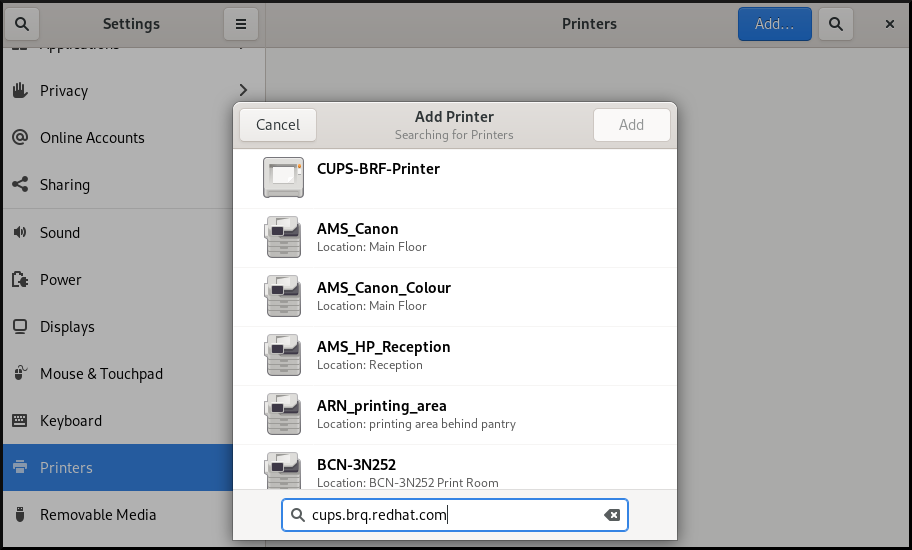
system-config-printer - Click on the "New Printer" button to add a new printer to your system.
Step 2: Authenticating the Printer Configuration Tool
Once you click on the "New Printer" button, you will be prompted to authenticate the Printer Configuration Tool. Follow these steps:
- Enter the root user password and click "OK" to authenticate.
- Click "Next" to proceed with the installation.
Step 3: Selecting the Printer Connection Type
Next, you will be prompted to select the printer connection type. Follow these steps:
- Choose the connection type that matches your printer's connection type (e.g., Wi-Fi, Ethernet, etc.).
- Click "Next" to proceed with the installation.

Step 4: Configuring the Printer
Once you have selected the printer connection type, you will be prompted to configure the printer. Follow these steps:
- Choose the printer model that matches your printer's model number.
- Enter the printer's IP address or hostname.
- Click "Add" to add the printer to your system.
Step 5: Testing the Printer
After adding the printer to your system, you can test the printer to ensure that it is working correctly. Follow these steps:
- Open a text editor or word processor and print a test page.
- Verify that the printer is printing the test page correctly.
Conclusion
Setting up a wireless printer on a Red Hat system using the Printer Configuration Tool is a relatively straightforward process. By following the steps outlined in this article, you should be able to configure your wireless printer and start printing from your Red Hat system. If you encounter any issues during the installation process, refer to the Red Hat documentation or seek assistance from a system administrator.
Additional Resources
For more information on setting up a wireless printer on Red Hat, refer to the following resources:
- Red Hat Documentation: Configuring Printer Device
- Red Hat Community: Setting Up a Wireless Printer